
Instructions for Garmin
1. Install TrakUpdate on Your Computer 2. Configure Settings
1. Install TrakUpdate on Your Computer
Exclusive to TrakMaps, just sit back and relax as we install & update your map on your computer & GPS with TrakUpdate!
Download for Windows Download for Mac
Once the setup file has been downloaded, make sure to run it and follow the steps to run TrakUpdate.
2. Configure Settings
Make sure to configure your GPS unit and computer using the steps below.
Inserting a microSD/SD card
Using one of the methods below.
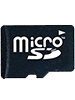

OR
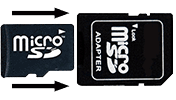
Selecting a map
- Turn on your GPS unit
- Choose Setup or Tools or Settings
- Choose Maps
- Choose Select Map or Map Information or Configure Maps
- Enable the TrakMaps and disable all other maps
Transparent (Non-routable) Maps
Certain products contain transparent and non-transparent (routable) maps.
- If you wish to use the routable map with turn by turn directions, please enable only the non-transparent map and disable all other maps.
- If you have a topographic map (eg. TrakMaps TOPO) you'd like to display below your transparent map, please enable that topographic map as well as the transparent map and disable all other maps. Please note that turn by turn directions will not work with this setup.
Certain units may present these menus differently.
Refer to your Garmin Owner’s Manual for more information.
Raising the level of detail
- Choose Setup or Tools or Settings
- Choose Maps
- Choose Advanced Map Setup
- Choose Detail
- Choose Highest
If your GPS unit slows down after this step, a lower level of detail is recommended.
Certain units may present these menus differently. Please refer to your Garmin Owner's Manual for more information.
Choosing a suitable routing mode
If you plan on following turn-by-turn routing on your GPS unit, make sure to choose a suitable routing mode.
Otherwise, the GPS unit may generate a straight line as the route.
- Choose Setup or Tools or Settings
- Choose Routing
- Select Car or Automobile
Certain units may present these menus differently. Please refer to your Garmin Owner's Manual for more information.
Creating a route
Please make sure that you are on a trail at the time of starting a route and that the start and end of the route are on a routable trail, otherwise you will receive routing error messages or a straight line.
You can create routes segment by segment if certain parts of your route are not routable.
Opening Garmin BaseCamp
In Windows:
- Press the Windows key on your keyboard > type BaseCamp > select Garmin BaseCamp
In Mac OS:
- Finder > Applications > select Garmin BaseCamp
Selecting a map
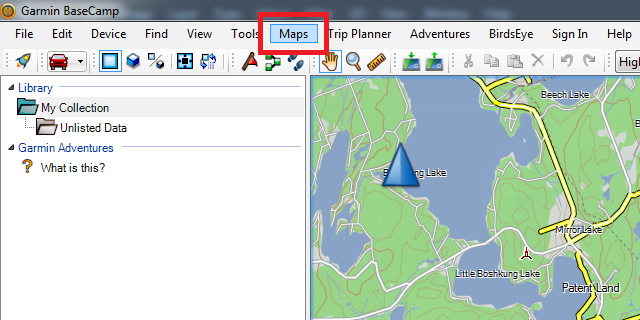
In the top menubar, choose Maps > [Your TrakMaps map]
Raising the level of detail
Windows
- Click on the View menu
- Choose Toolbars
- Choose Detail Level if it is not already checked
- A new dropdown menu (usually set to Medium) will appear just below the File menu - change it to Highest
Mac
Move the Detail slider (located below the map) to the right
Tips & Tricks
Check out these tips and tricks from our blog to get the most from your map.
Learning CenterMicrosoft, Windows 7 and Windows 10 are registered trademarks of Microsoft Corporation.
Mac and Mac OS are registered trademarks of Apple Inc.